

How to Update an LG Fridge Control Board After Compressor Replacement
Introduction
Replacing a failed compressor on certain LG refrigerators is only part of the repair. Some models also require an update to the main control board’s firmware so the board can properly operate the replacement compressor. Whether that update is needed depends on the refrigerator and the replacement being installed.
If you are wondering how to update LG fridge control board firmware after compressor replacement, the important distinction is that this is a professional repair procedure—not a routine software update for homeowners. A trained appliance technician needs LG-specific equipment and the correct manufacturer instructions and update for the refrigerator. This overview explains the process and why completing every applicable step matters.
Why Does an LG Refrigerator Control Board Need an Update?
The main control board helps manage compressor operation. Its firmware provides the instructions the board uses to operate the installed equipment. On certain LG models, a replacement compressor requires updated firmware so the control board can operate it correctly.
When an update is required, installing the new compressor without completing that update can leave the repair incomplete. The compressor may not operate as intended, and in some applicable repairs that can contribute to premature failure. This does not mean every LG refrigerator or every compressor replacement needs flashing; the technician must verify the requirements for the specific model and repair.
A compressor failure is part of the refrigerator’s sealed system. To understand that part of the repair and the cost considerations, learn more about LG sealed system fridge problems and repair costs.
How to Update an LG Fridge Control Board
The five stages below describe the technician’s workflow, not a universal set of wiring instructions. The exact procedure can vary by LG model, control board, replacement compressor, and update equipment. A technician first confirms that the repair calls for an update and follows the applicable LG instructions throughout.
1. Disconnect Power to the Refrigerator
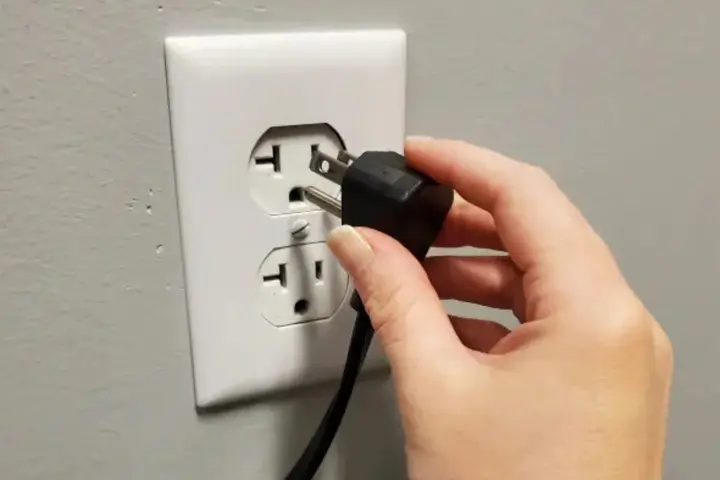
Before connecting the update equipment, the technician disconnects the refrigerator from power as directed by the applicable LG service procedure. Working around an energized board creates an electrical hazard, so the technician follows the manufacturer’s model-specific safety and setup instructions rather than assuming every repair uses the same electrical procedure.
Disconnecting the plug is part of safe preparation, not permission to handle the electronics yourself. A trained technician must complete the required safety checks before accessing the board.
2. Check the LG Update Jig
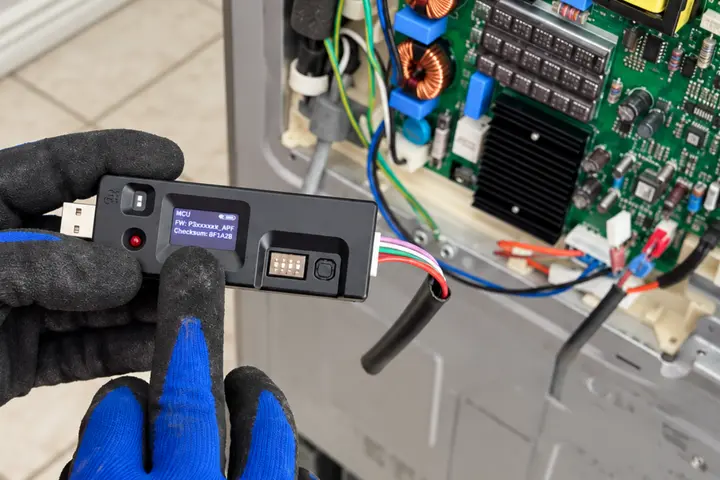
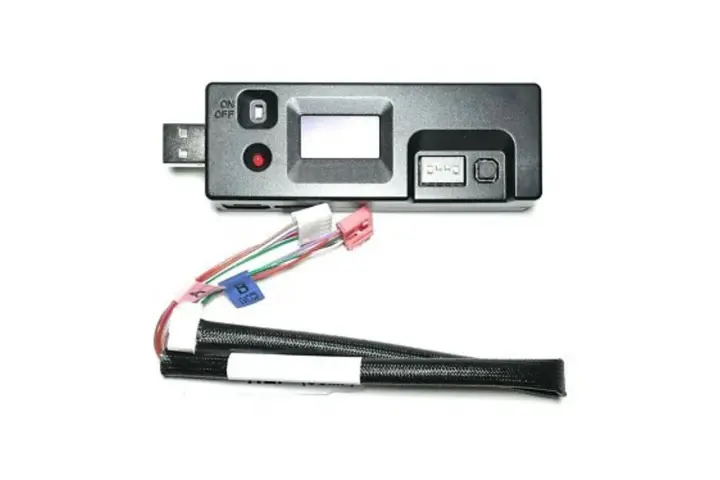
The update jig is the specialized equipment used to communicate with the control board during flashing. Before beginning, the technician verifies that the correct jig and compatible harness are available and that the equipment is sufficiently charged for the applicable procedure.
Low voltage can prevent an update from completing successfully. Checking the equipment beforehand helps avoid starting a firmware transfer that cannot finish reliably. The technician also confirms that the required update and instructions apply to the refrigerator being repaired.
3. Connect the Update Jig to the Control Board
The technician uses the correct harness and the connection points specified for that particular board. This is not a step where wire colors alone can establish compatibility or tell someone where to connect equipment.
In the example setup described for this article, red is identified as VCC and white as TX. Those labels are examples from that setup, not universal LG wire assignments or a connector pinout. A technician must follow the correct LG procedure for the specific model rather than assume another board uses the same arrangement.
4. Run the Firmware Update
Once the required setup is verified, the jig communicates with the control board and checks information such as the microcontroller (MCU) and checksum. In the process described for this article, the existing program is erased and the appropriate new firmware is written to the board.
The supplied example gives an approximate update time of 30–45 seconds. That is not a universal LG timing requirement or a reason to disconnect equipment when a timer expires. Duration and the exact update sequence depend on the applicable board, firmware, equipment, and manufacturer procedure.
5. Confirm the Update Was Successful
A progress indicator that appears finished is not enough. The technician waits for the required completion confirmation and checks that the update succeeded before disconnecting the jig according to the applicable instructions.
The example confirmation described for this article is “Checksum match – Upgrade complete.” In that example, the message confirms that the firmware was successfully written and verified. Other equipment or procedures may use different wording, so the technician must verify the success indication required for the specific update rather than expect that exact message on every LG repair.
What Happens If You Don't Flash the Control Board?
If a particular compressor replacement requires updated firmware and that step is skipped, the control board may not operate the new compressor according to the specifications required for the replacement. The result can be cooling problems or poor compressor performance even though the physical component has been replaced.
In some applicable repairs, omitting the required update may also contribute to premature failure of the newly installed compressor. A complete compressor repair therefore means addressing the entire manufacturer-required procedure—not simply swapping the component. If the manufacturer does not require an update for a specific repair, flashing should not be assumed necessary.
Can You Update an LG Refrigerator Control Board Yourself?
This is generally not a typical DIY firmware update. It requires the appropriate LG flashing equipment, a compatible harness, the correct firmware and procedure, and knowledge of the refrigerator’s electronics. An incorrect connection, an interrupted update, or the wrong firmware could leave the refrigerator inoperable.
Professional diagnosis should come first. A refrigerator that is not cooling can have causes unrelated to the compressor or control board, and a firmware update is not a general fix for every cooling complaint. A trained technician can identify the actual fault and determine whether a control board update belongs in the repair.
LG Refrigerator Not Cooling? Get the Complete Repair
A lasting compressor repair depends on completing every manufacturer-required step for the refrigerator being serviced. AG Appliance Service technicians can diagnose the cooling problem, determine whether the compressor or another component has failed, and complete applicable control board updates during the repair.
For help with your refrigerator, learn more about LG fridge repair in Miami and have the problem assessed before assuming the board needs flashing.
Get Your LG Refrigerator Diagnosed
Let AG Appliance Service identify the cooling problem and complete the applicable repair, including a model-specific control board update when required.
Schedule LG Fridge Repair in Miami